

Villefranche-sur-Mer Introduction Walking Tour (Self Guided), Villefranche-sur-Mer
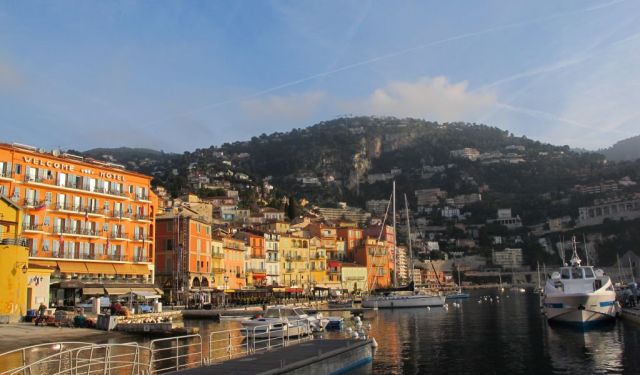
Nestled along the glittering French Riviera, Villefranche-sur-Mer mixes historic charm and modern Mediterranean zest like a perfect cocktail. Founded in the 13th century, this scenic town started life as a strategic coastal stronghold to fend off maritime invaders. Its name literally translates to "free town," thanks to tempting tax breaks aimed at attracting settlers-because, really, who can resist a good tax deal?
The town's postcard-perfect bay, naturally deep and sheltered, quickly turned Villefranche into a crucial naval port. In the 16th century, its importance was sealed by the construction of the Citadel of Saint-Elme, built under the vigilant watch of the Duke of Savoy. Today, this fortress swaps cannons for culture, with museums, lush gardens, and stunning views of the bay and coastline.
Meanwhile, the picturesque Old Town enchants with its narrow, winding streets, pastel-colored buildings, and general atmosphere. Don't miss Rue Obscure, a covered medieval street and one of the town's most intriguing features. Another must-see is the nearby promenade that buzzes with cafés and restaurants-perfect for lazy afternoons spent yacht-spotting.
Throughout the 20th century, Villefranche became a magnet for artists, writers, and celebrities, all irresistibly drawn by the many inspiring vistas. The bay has even caught Hollywood's eye, serving as the backdrop for countless films-including Alfred Hitchcock's classic "To Catch a Thief."
Ready to dive in? Lace up your walking shoes and let our self-guided tour lead you through every captivating corner of this beloved Mediterranean destination.
The town's postcard-perfect bay, naturally deep and sheltered, quickly turned Villefranche into a crucial naval port. In the 16th century, its importance was sealed by the construction of the Citadel of Saint-Elme, built under the vigilant watch of the Duke of Savoy. Today, this fortress swaps cannons for culture, with museums, lush gardens, and stunning views of the bay and coastline.
Meanwhile, the picturesque Old Town enchants with its narrow, winding streets, pastel-colored buildings, and general atmosphere. Don't miss Rue Obscure, a covered medieval street and one of the town's most intriguing features. Another must-see is the nearby promenade that buzzes with cafés and restaurants-perfect for lazy afternoons spent yacht-spotting.
Throughout the 20th century, Villefranche became a magnet for artists, writers, and celebrities, all irresistibly drawn by the many inspiring vistas. The bay has even caught Hollywood's eye, serving as the backdrop for countless films-including Alfred Hitchcock's classic "To Catch a Thief."
Ready to dive in? Lace up your walking shoes and let our self-guided tour lead you through every captivating corner of this beloved Mediterranean destination.
How it works: Download the app "GPSmyCity: Walks in 1K+ Cities" from Apple App Store or Google Play Store to your mobile phone or tablet. The app turns your mobile device into a personal tour guide and its built-in GPS navigation functions guide you from one tour stop to next. The app works offline, so no data plan is needed when traveling abroad.
Download The GPSmyCity App



Villefranche-sur-Mer Introduction Walking Tour Map
Guide Name: Villefranche-sur-Mer Introduction Walking Tour
Guide Location: France » Villefranche-sur-Mer (See other walking tours in Villefranche-sur-Mer)
Guide Type: Self-guided Walking Tour (Sightseeing)
Tour Duration: 1 Hour(s)
Travel Distance: 1.4 Km or 0.9 Miles
Tour Best Suited For: First-time visit
Guide Location: France » Villefranche-sur-Mer (See other walking tours in Villefranche-sur-Mer)
Guide Type: Self-guided Walking Tour (Sightseeing)
Tour Duration: 1 Hour(s)
Travel Distance: 1.4 Km or 0.9 Miles
Tour Best Suited For: First-time visit
Sights Featured in This Walk


The Most Popular Cities
/ view all