

Trieste's Ancient Roman Sites Walking Tour (Self Guided), Trieste
The Roman remains on Trieste extend along the northwestern slope of San Giusto Hill, overlooking the Gulf of Trieste. Wharves of sandstone slabs dating from the 1st century AD were found by the Roman Theatre. The city walls, ordered by Augustus, were converted to use as terraces.
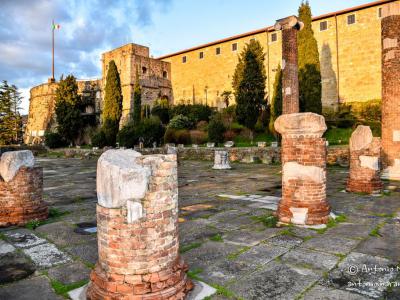
The Propylaeum of the 1st century AD was the gateway to the sacred area of the Capitoline Temple. There are two colonnaded structures flanking a staircase and leading to a tunnel to the Lapidary Garden (Orto Lapidario). The civil Basilica on the left of the Propylaeum had three naves.
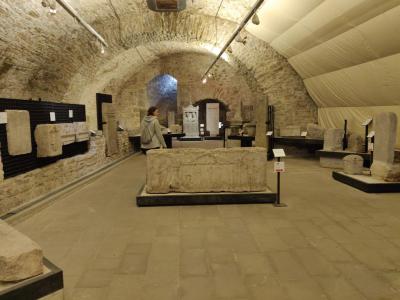
The Tergestino Lapidary in the 16th century Lalio Bastion of the San Giusto Castle houses monuments from the Roman Basilica, Forum, and Propylaeum. Shown are religious items dedicated to Jove, Cybele, Silvanus, Hercules, and Minerva.
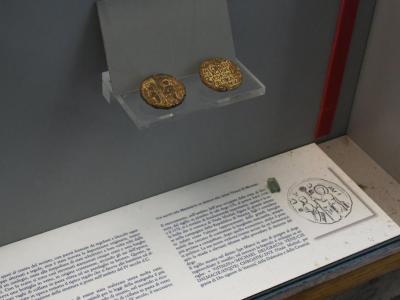
The Roman Theatre, city walls, and the necropolis yielded altars, steles, urns, and sarcophagi with names. One room has mosaics from a 1st-century BC villa. There are items from the 6th century AD.
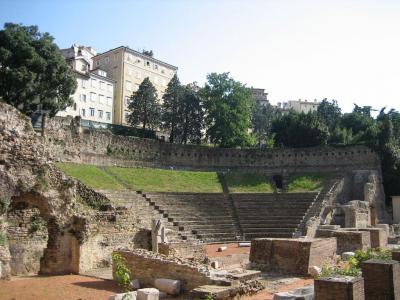
The Donata Antiquarium is attached to Donata Tower. Exhibits here were taken from the Roman Theatre. Behind the Theatre were a residential area and a cemetery. The theatre stone seats could hold 3,500 people. The stage was made of wood. Doors, columns, and sculptures taken from the Theatre are on exhibit at the Tergestino Lapidary in the San Giusto Castle.
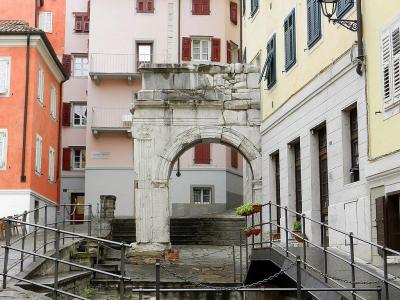
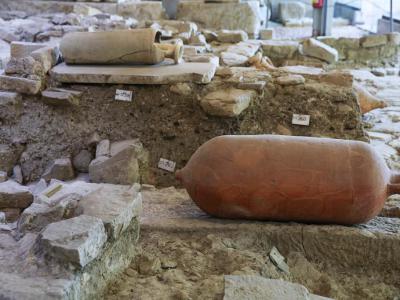
The Richard's Arch (Arco Ricardo) in the Piazza Barbacan dates from the 1st century AD. The arch is simple and solid, decorated with pilasters and vegetable motifs. The Antiquarium in Seminary Street (Antiquarium via del Seminario) holds a long portion of the old city walls. The walls were made with two-facing sandstone blocks filled with rubble and lime.
An archeological zone in an ancient residential section holding fine mosaics and frescoes is reserved for further excavation. There's more to come.
The Propylaeum of the 1st century AD was the gateway to the sacred area of the Capitoline Temple. There are two colonnaded structures flanking a staircase and leading to a tunnel to the Lapidary Garden (Orto Lapidario). The civil Basilica on the left of the Propylaeum had three naves.
The Tergestino Lapidary in the 16th century Lalio Bastion of the San Giusto Castle houses monuments from the Roman Basilica, Forum, and Propylaeum. Shown are religious items dedicated to Jove, Cybele, Silvanus, Hercules, and Minerva.
The Roman Theatre, city walls, and the necropolis yielded altars, steles, urns, and sarcophagi with names. One room has mosaics from a 1st-century BC villa. There are items from the 6th century AD.
The Donata Antiquarium is attached to Donata Tower. Exhibits here were taken from the Roman Theatre. Behind the Theatre were a residential area and a cemetery. The theatre stone seats could hold 3,500 people. The stage was made of wood. Doors, columns, and sculptures taken from the Theatre are on exhibit at the Tergestino Lapidary in the San Giusto Castle.
The Richard's Arch (Arco Ricardo) in the Piazza Barbacan dates from the 1st century AD. The arch is simple and solid, decorated with pilasters and vegetable motifs. The Antiquarium in Seminary Street (Antiquarium via del Seminario) holds a long portion of the old city walls. The walls were made with two-facing sandstone blocks filled with rubble and lime.
An archeological zone in an ancient residential section holding fine mosaics and frescoes is reserved for further excavation. There's more to come.
How it works: Download the app "GPSmyCity: Walks in 1K+ Cities" from Apple App Store or Google Play Store to your mobile phone or tablet. The app turns your mobile device into a personal tour guide and its built-in GPS navigation functions guide you from one tour stop to next. The app works offline, so no data plan is needed when traveling abroad.
Download The GPSmyCity App



Trieste's Ancient Roman Sites Walking Tour Map
Guide Name: Trieste's Ancient Roman Sites Walking Tour
Guide Location: Italy » Trieste (See other walking tours in Trieste)
Guide Type: Self-guided Walking Tour (Sightseeing)
Tour Duration: 1 Hour(s)
Travel Distance: 0.9 Km or 0.6 Miles
Tour Best Suited For: In-depth exploration
Guide Location: Italy » Trieste (See other walking tours in Trieste)
Guide Type: Self-guided Walking Tour (Sightseeing)
Tour Duration: 1 Hour(s)
Travel Distance: 0.9 Km or 0.6 Miles
Tour Best Suited For: In-depth exploration
Sights Featured in This Walk
Walking Tours in Trieste, Italy
Create Your Own Walk in Trieste
Creating your own self-guided walk in Trieste is easy and fun. Choose the city attractions that you want to see and a walk route map will be created just for you. You can even set your hotel as the start point of the walk.
Trieste Introduction Walking Tour
Let’s drop into Trieste, a city that’s always had one foot in Central Europe and the other dipping into the Adriatic. It sits at Italy’s northeastern edge, pressed against Slovenia, where winds tear across the Karst Plateau and caves open like gateways underground. Some call it “Vienna by the Sea,” others swear it’s the “City of Coffee,” but labels never really fit. From the start,... view more
Tour Duration: 2 Hour(s)
Travel Distance: 3.7 Km or 2.3 Miles
Tour Duration: 2 Hour(s)
Travel Distance: 3.7 Km or 2.3 Miles
The Most Popular Cities
/ view all