

Audio Guide: Almaty City Center Walking Tour (Self Guided), Almaty
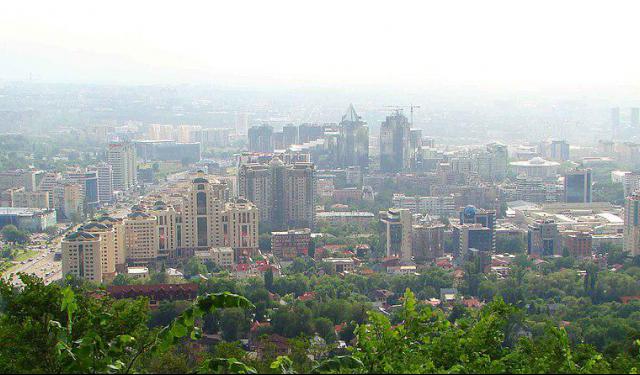
Almaty is the largest city in Kazakhstan and, despite no longer being the national capital, remains its cultural, financial, and historical center. Nursultan Nazarbayev, the first President of Kazakhstan, once described Almaty as “the pearl of Kazakhstan, the most beautiful city in Central Asia.”
The area of present-day Almaty has been inhabited since ancient times. Archaeological evidence suggests that settlement here dates back to the Bronze Age, around 1000 BC, and over time, the region became integrated into the northern branches of the Silk Road. Thanks to its strategic location, local communities prospered through trade connecting Central Asia, China, and the Eurasian steppe.
The city’s identity is closely tied to apples. The name Almaty is generally derived from the Turkic and Kazakh word for apple and is commonly interpreted as meaning “rich in apples” or “place of apples.” Another local tradition connects the name to the ancient settlement of Almatau, translated as “Apple Mountain.” It all makes sense as the surrounding Tian Shan Mountains are widely recognized as the genetic birthplace of the world's domesticated apples.
Modern Almaty emerged under the Russian Empire in 1854, when a military fort named Verny was established. Russian settlers, Cossacks, and merchants transformed the outpost into an administrative and commercial center, and by 1867, Verny had become the regional center of Semirechye Province.
After Soviet rule was established, the city was renamed Alma-Ata in 1921. A major turning point came in 1929, when it became the capital of Soviet Kazakhstan. Together with the arrival of the Turkestan-Siberia Railway, this period accelerated industrialization and transformed Almaty into a modern center of education, culture, and commerce.
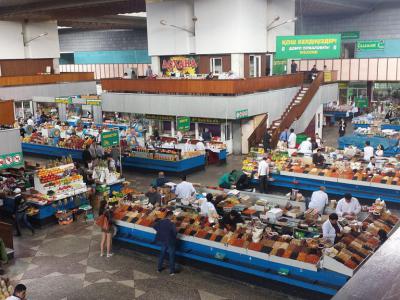
A walk through central Almaty reveals a city shaped by both commerce and memory. Visitors strolling along Arbat Shopping Street encounter cafés, performers, and lively public spaces before arriving at the Green Bazaar, where stalls display fresh produce, spices, and local specialties. Nearby, Panfilov Park provides one of the city’s most beloved gathering places, while the colorful Ascension Cathedral rises among its trees and remains one of Almaty’s most recognizable landmarks.
Following Kazakhstan’s independence in 1991, Almaty remained the national capital until 1997, when the government moved to Astana. Yet the city retained its role as Kazakhstan’s most cosmopolitan urban center-a place where ancient traditions and modern innovations coexist. To experience this blend firsthand, begin your walk through the city center, where lively streets, historic landmarks, markets, and mountain views reveal Almaty’s enduring character.
The area of present-day Almaty has been inhabited since ancient times. Archaeological evidence suggests that settlement here dates back to the Bronze Age, around 1000 BC, and over time, the region became integrated into the northern branches of the Silk Road. Thanks to its strategic location, local communities prospered through trade connecting Central Asia, China, and the Eurasian steppe.
The city’s identity is closely tied to apples. The name Almaty is generally derived from the Turkic and Kazakh word for apple and is commonly interpreted as meaning “rich in apples” or “place of apples.” Another local tradition connects the name to the ancient settlement of Almatau, translated as “Apple Mountain.” It all makes sense as the surrounding Tian Shan Mountains are widely recognized as the genetic birthplace of the world's domesticated apples.
Modern Almaty emerged under the Russian Empire in 1854, when a military fort named Verny was established. Russian settlers, Cossacks, and merchants transformed the outpost into an administrative and commercial center, and by 1867, Verny had become the regional center of Semirechye Province.
After Soviet rule was established, the city was renamed Alma-Ata in 1921. A major turning point came in 1929, when it became the capital of Soviet Kazakhstan. Together with the arrival of the Turkestan-Siberia Railway, this period accelerated industrialization and transformed Almaty into a modern center of education, culture, and commerce.
A walk through central Almaty reveals a city shaped by both commerce and memory. Visitors strolling along Arbat Shopping Street encounter cafés, performers, and lively public spaces before arriving at the Green Bazaar, where stalls display fresh produce, spices, and local specialties. Nearby, Panfilov Park provides one of the city’s most beloved gathering places, while the colorful Ascension Cathedral rises among its trees and remains one of Almaty’s most recognizable landmarks.
Following Kazakhstan’s independence in 1991, Almaty remained the national capital until 1997, when the government moved to Astana. Yet the city retained its role as Kazakhstan’s most cosmopolitan urban center-a place where ancient traditions and modern innovations coexist. To experience this blend firsthand, begin your walk through the city center, where lively streets, historic landmarks, markets, and mountain views reveal Almaty’s enduring character.
How it works: Download the app "GPSmyCity: Walks in 1K+ Cities" from Apple App Store or Google Play Store to your mobile phone or tablet. The app turns your mobile device into a personal tour guide and its built-in GPS navigation functions guide you from one tour stop to next. The app works offline, so no data plan is needed when traveling abroad.
Download The GPSmyCity App



Almaty City Center Walking Tour Map
Guide Name: Almaty City Center Walking Tour
Guide Location: Kazakhstan » Almaty (See other walking tours in Almaty)
Guide Type: Self-guided Walking Tour (Sightseeing)
Tour Duration: 2 Hours
Travel Distance: 3.6 Km or 2.2 Miles
Tour Best Suited For: First-time visit
Guide Location: Kazakhstan » Almaty (See other walking tours in Almaty)
Guide Type: Self-guided Walking Tour (Sightseeing)
Tour Duration: 2 Hours
Travel Distance: 3.6 Km or 2.2 Miles
Tour Best Suited For: First-time visit
Sights Featured in This Walk



City Walks Overview
