

La Rochelle Introduction Walking Tour (Self Guided), La Rochelle
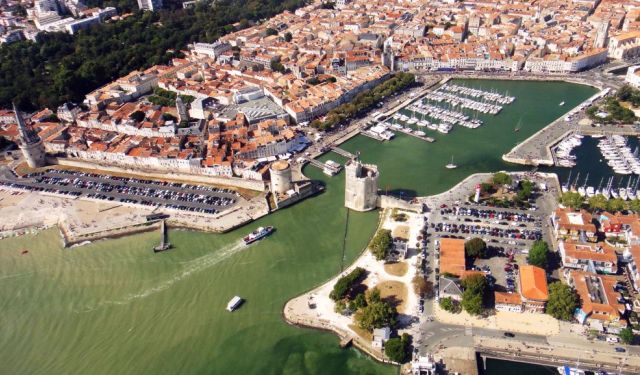
La Rochelle, tucked along France’s Atlantic coast, has always marched to the beat of its own drum. What began as a quiet fishing village quickly transformed into a thriving medieval port by the 12th century, trading wine, salt, and fish with anyone who’d sail close enough. With a sheltered harbor and a strong streak of independence, the city grew rich-and just a bit unruly. French kings spent centuries trying to bring it to heel.
By the 16th century, La Rochelle had taken on a new identity as a Protestant stronghold during the Wars of Religion. Far from laying low, the city built its own walls, minted its own coins, and acted like a seafaring republic with zero interest in royal oversight. That rebellious spirit didn’t go unnoticed-Cardinal Richelieu famously laid siege to the city in 1627. After a devastating blockade that starved the population into surrender, royal power returned.
In the centuries that followed Richelieu’s siege, La Rochelle rebounded-again-by leaning into what it knew best: the sea. It became one of France’s busiest Atlantic ports, launching merchant ships, explorers, and trading vessels far beyond European waters. But like many port cities of its time, part of that prosperity came through involvement in the transatlantic slave trade.
La Rochelle once again found itself in the spotlight during World War II, when it was turned into a German submarine base-so strategically placed that it was one of the last pockets of France to be liberated. Today, thought, the tension has long since lifted. The harbor fills with sailboats, not submarines, and its seafood scene has replaced the sound of sirens.
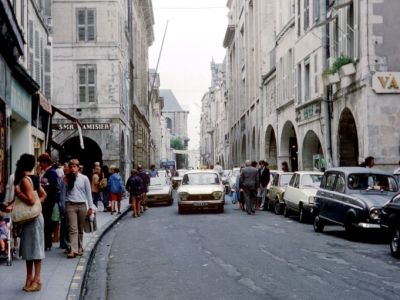
What sets La Rochelle apart is its ability to evolve while keeping its character. With arcaded walkways, sunlit limestone buildings, and buzzing harborside cafés, it’s a place that invites wandering. The old town is compact and welcoming, perfect for exploring on foot.
To experience the full journey, follow our self-guided walking tour that leads you through key sites and plenty more along the way. Let La Rochelle show you what centuries of independence look like-in stone, salt, and sea air.
By the 16th century, La Rochelle had taken on a new identity as a Protestant stronghold during the Wars of Religion. Far from laying low, the city built its own walls, minted its own coins, and acted like a seafaring republic with zero interest in royal oversight. That rebellious spirit didn’t go unnoticed-Cardinal Richelieu famously laid siege to the city in 1627. After a devastating blockade that starved the population into surrender, royal power returned.
In the centuries that followed Richelieu’s siege, La Rochelle rebounded-again-by leaning into what it knew best: the sea. It became one of France’s busiest Atlantic ports, launching merchant ships, explorers, and trading vessels far beyond European waters. But like many port cities of its time, part of that prosperity came through involvement in the transatlantic slave trade.
La Rochelle once again found itself in the spotlight during World War II, when it was turned into a German submarine base-so strategically placed that it was one of the last pockets of France to be liberated. Today, thought, the tension has long since lifted. The harbor fills with sailboats, not submarines, and its seafood scene has replaced the sound of sirens.
What sets La Rochelle apart is its ability to evolve while keeping its character. With arcaded walkways, sunlit limestone buildings, and buzzing harborside cafés, it’s a place that invites wandering. The old town is compact and welcoming, perfect for exploring on foot.
To experience the full journey, follow our self-guided walking tour that leads you through key sites and plenty more along the way. Let La Rochelle show you what centuries of independence look like-in stone, salt, and sea air.
How it works: Download the app "GPSmyCity: Walks in 1K+ Cities" from Apple App Store or Google Play Store to your mobile phone or tablet. The app turns your mobile device into a personal tour guide and its built-in GPS navigation functions guide you from one tour stop to next. The app works offline, so no data plan is needed when traveling abroad.
Download The GPSmyCity App



La Rochelle Introduction Walking Tour Map
Guide Name: La Rochelle Introduction Walking Tour
Guide Location: France » La Rochelle (See other walking tours in La Rochelle)
Guide Type: Self-guided Walking Tour (Sightseeing)
Tour Duration: 2 Hour(s)
Travel Distance: 2.2 Km or 1.4 Miles
Guide Location: France » La Rochelle (See other walking tours in La Rochelle)
Guide Type: Self-guided Walking Tour (Sightseeing)
Tour Duration: 2 Hour(s)
Travel Distance: 2.2 Km or 1.4 Miles
Sights Featured in This Walk
The Most Popular Cities
/ view all