

Norfolk Introduction Walking Tour (Self Guided), Norfolk
The Southern forces were left dumbfounded when one of their own, Norfolk native Mary Louvestre, revealed their plans to the Union government. Mary's act gave the Union navy an upper hand in the sea battle against Confederate ships.
In 1636, English colonists established a small settlement along the Elizabeth River, recognizing the area’s natural deep-water harbor as a vital asset for trade and defense. By 1682, Norfolk was officially founded as a town, and it quickly grew into a key port within the Virginia Colony.
The city's name, derived from the English county of Norfolk, means “northern folk” or “people from the north,” a reminder of the English settlers who founded it.
Throughout the 18th century, Norfolk prospered as a center for tobacco, cotton, timber, and naval commerce. However, its success made it a target during the American Revolution. In January 1776, British forces bombarded and burned much of the town after colonial resistance, leaving it in ruins. Despite this destruction, Norfolk rebuilt and remained a vital maritime hub for the new nation. During the early 19th century, its shipyards and waterfront fueled growing trade across the Atlantic and the Caribbean.
The Civil War brought new turmoil. Due to its location, Norfolk became a strategic point for both Union and Confederate forces. The nearby Battle of Hampton Roads in 1862, featuring the famous clash between the ironclad ships Monitor and Virginia, revolutionized naval warfare and cemented Norfolk’s place in military history. After the war, the city’s economy shifted from agriculture to industry, supported by its expanding shipyards and trade routes.
A turning point came in 1917 with the creation of the Norfolk Naval Station, which remains the largest naval base in the world. World War I and World War II transformed Norfolk into a military and shipbuilding powerhouse, drawing thousands of workers and sailors from across the country. The city’s postwar years were marked by urban renewal, economic diversification, and the growth of institutions like Old Dominion University and the Port of Virginia.
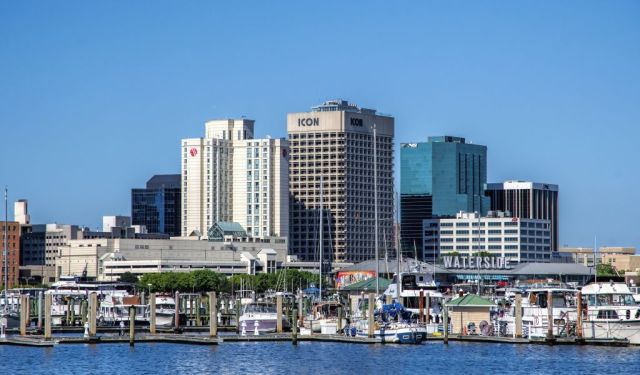
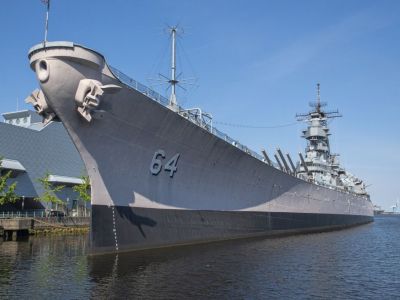
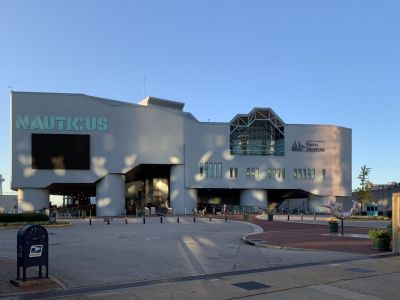
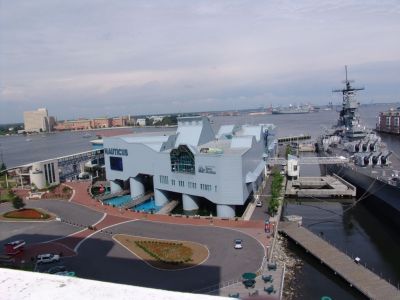
Walking through downtown Norfolk, visitors encounter a lively mix of history and waterfront charm. Modern skyscrapers rise beside restored brick warehouses, while the Elizabeth River slides alongside the scenic Waterside District. The Nauticus maritime museum and the Battleship Wisconsin tell the city’s naval story, and tree-lined streets lead to local cafés, boutiques, and art galleries. Public murals, open-air plazas, and harbor views emphasize the welcoming atmosphere.
Once a colonial outpost and now a symbol of endurance, Norfolk invites you to see for yourself if Mary's act of bravery was worth it. Follow this self-guided walking tour and explore Norfolk at your own pace.
In 1636, English colonists established a small settlement along the Elizabeth River, recognizing the area’s natural deep-water harbor as a vital asset for trade and defense. By 1682, Norfolk was officially founded as a town, and it quickly grew into a key port within the Virginia Colony.
The city's name, derived from the English county of Norfolk, means “northern folk” or “people from the north,” a reminder of the English settlers who founded it.
Throughout the 18th century, Norfolk prospered as a center for tobacco, cotton, timber, and naval commerce. However, its success made it a target during the American Revolution. In January 1776, British forces bombarded and burned much of the town after colonial resistance, leaving it in ruins. Despite this destruction, Norfolk rebuilt and remained a vital maritime hub for the new nation. During the early 19th century, its shipyards and waterfront fueled growing trade across the Atlantic and the Caribbean.
The Civil War brought new turmoil. Due to its location, Norfolk became a strategic point for both Union and Confederate forces. The nearby Battle of Hampton Roads in 1862, featuring the famous clash between the ironclad ships Monitor and Virginia, revolutionized naval warfare and cemented Norfolk’s place in military history. After the war, the city’s economy shifted from agriculture to industry, supported by its expanding shipyards and trade routes.
A turning point came in 1917 with the creation of the Norfolk Naval Station, which remains the largest naval base in the world. World War I and World War II transformed Norfolk into a military and shipbuilding powerhouse, drawing thousands of workers and sailors from across the country. The city’s postwar years were marked by urban renewal, economic diversification, and the growth of institutions like Old Dominion University and the Port of Virginia.
Walking through downtown Norfolk, visitors encounter a lively mix of history and waterfront charm. Modern skyscrapers rise beside restored brick warehouses, while the Elizabeth River slides alongside the scenic Waterside District. The Nauticus maritime museum and the Battleship Wisconsin tell the city’s naval story, and tree-lined streets lead to local cafés, boutiques, and art galleries. Public murals, open-air plazas, and harbor views emphasize the welcoming atmosphere.
Once a colonial outpost and now a symbol of endurance, Norfolk invites you to see for yourself if Mary's act of bravery was worth it. Follow this self-guided walking tour and explore Norfolk at your own pace.
How it works: Download the app "GPSmyCity: Walks in 1K+ Cities" from Apple App Store or Google Play Store to your mobile phone or tablet. The app turns your mobile device into a personal tour guide and its built-in GPS navigation functions guide you from one tour stop to next. The app works offline, so no data plan is needed when traveling abroad.
Download The GPSmyCity App



Norfolk Introduction Walking Tour Map
Guide Name: Norfolk Introduction Walking Tour
Guide Location: USA » Norfolk (See other walking tours in Norfolk)
Guide Type: Self-guided Walking Tour (Sightseeing)
Tour Duration: 2 Hours
Travel Distance: 3 Km or 1.9 Miles
Tour Best Suited For: First-time visit
Guide Location: USA » Norfolk (See other walking tours in Norfolk)
Guide Type: Self-guided Walking Tour (Sightseeing)
Tour Duration: 2 Hours
Travel Distance: 3 Km or 1.9 Miles
Tour Best Suited For: First-time visit
Sights Featured in This Walk





City Walks Overview
