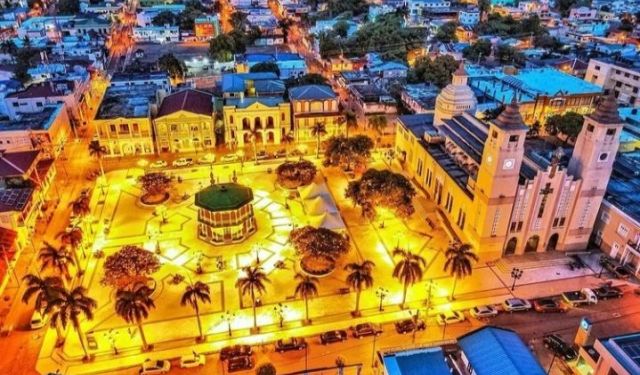


Puerto Plata Introduction Walking Tour (Self Guided), Puerto Plata
Puerto Plata, perched on the northern coast of the Dominican Republic, is one of the country’s oldest and most historically layered cities. Its story begins in the late 15th century, when Christopher Columbus is believed to have passed through the area during his first voyage in 1493. The name-meaning “Silver Port”-comes from the way the nearby mountains reflect the light when seen from the sea. In 1502, the Spanish formally established the city, making it one of the earliest European settlements in the Americas.
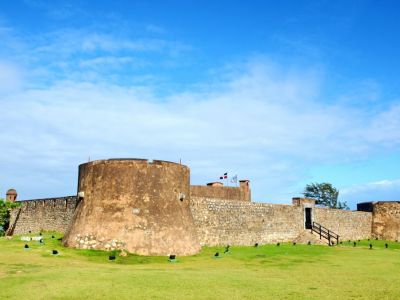
In the early colonial period, Puerto Plata was a key port in the Spanish Empire’s Atlantic network. Its role in trade and exploration made it both valuable and vulnerable. The constant threat of piracy led to the construction of San Felipe Fortress in the 16th century. This stone stronghold, still standing today, is one of the oldest colonial military sites in the Western Hemisphere. Despite such defenses, the city endured repeated pirate attacks, eventually prompting Spanish authorities to depopulate the area in the 1600s in an attempt to curb the chaos.
The 19th century marked a turning point. Puerto Plata reemerged as a center of trade, political ideas, and cultural activity. It played a key role in the Dominican Republic’s independence efforts and civil movements. After a devastating fire in 1863, much of the city was rebuilt in wood, giving rise to the elegant Victorian-style homes and public buildings that still define its streetscape today.
Today, Puerto Plata blends that heritage with a vibrant present. Its colonial landmarks, like the fortress and historic district, remain focal points, while the city’s lively boardwalk and surrounding natural beauty continue to draw visitors. From conquest and piracy to rebellion and renewal, Puerto Plata’s story spans centuries and continues to unfold.
To get a closer look at the places that shaped Puerto Plata’s story, follow our self-guided walking tour through the city’s key sites. Each stop adds another piece to the larger picture.
In the early colonial period, Puerto Plata was a key port in the Spanish Empire’s Atlantic network. Its role in trade and exploration made it both valuable and vulnerable. The constant threat of piracy led to the construction of San Felipe Fortress in the 16th century. This stone stronghold, still standing today, is one of the oldest colonial military sites in the Western Hemisphere. Despite such defenses, the city endured repeated pirate attacks, eventually prompting Spanish authorities to depopulate the area in the 1600s in an attempt to curb the chaos.
The 19th century marked a turning point. Puerto Plata reemerged as a center of trade, political ideas, and cultural activity. It played a key role in the Dominican Republic’s independence efforts and civil movements. After a devastating fire in 1863, much of the city was rebuilt in wood, giving rise to the elegant Victorian-style homes and public buildings that still define its streetscape today.
Today, Puerto Plata blends that heritage with a vibrant present. Its colonial landmarks, like the fortress and historic district, remain focal points, while the city’s lively boardwalk and surrounding natural beauty continue to draw visitors. From conquest and piracy to rebellion and renewal, Puerto Plata’s story spans centuries and continues to unfold.
To get a closer look at the places that shaped Puerto Plata’s story, follow our self-guided walking tour through the city’s key sites. Each stop adds another piece to the larger picture.
How it works: Download the app "GPSmyCity: Walks in 1K+ Cities" from Apple App Store or Google Play Store to your mobile phone or tablet. The app turns your mobile device into a personal tour guide and its built-in GPS navigation functions guide you from one tour stop to next. The app works offline, so no data plan is needed when traveling abroad.
Download The GPSmyCity App



Puerto Plata Introduction Walking Tour Map
Guide Name: Puerto Plata Introduction Walking Tour
Guide Location: Dominican Republic » Puerto Plata (See other walking tours in Puerto Plata)
Guide Type: Self-guided Walking Tour (Sightseeing)
Tour Duration: 2 Hour(s)
Travel Distance: 2.7 Km or 1.7 Miles
Guide Location: Dominican Republic » Puerto Plata (See other walking tours in Puerto Plata)
Guide Type: Self-guided Walking Tour (Sightseeing)
Tour Duration: 2 Hour(s)
Travel Distance: 2.7 Km or 1.7 Miles
Sights Featured in This Walk


The Most Popular Cities
/ view all