

Sioux Falls Introduction Walking Tour (Self Guided), Sioux Falls
Sioux Falls, the largest city in South Dakota, owes its name to the powerful Sioux people who once lived in the region and the cascading waterfalls of the Big Sioux River which have shaped both the landscape and the city’s development.
European exploration of the area began in the early 18th century. First settled in 1856, the land around the falls then had to be abandoned because of tensions with Indigenous tribes. However, in 1865, Fort Dakota was established, leading to renewed settlement. In 1883, Sioux Falls was incorporated as a city, and the arrival of railroads fueled its rapid growth.
By the early 1900s, Sioux Falls gained national attention as a "Divorce Colony" due to lenient divorce laws. The 1981 relocation of Citibank sparked financial and economic development, which ultimately saw Sioux Falls' population more than double over the next four decades, solidifying its status as South Dakota’s economic and cultural center.
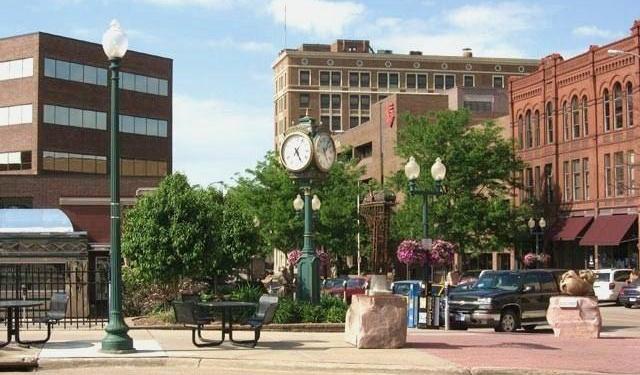
While keeping the rugged spirit of the Old West, today the city blends history with modern energy and is packed with cultural sights and family-friendly activities. One of the best ways to explore Sioux Falls is through its downtown core. Phillips Avenue, the city’s main thoroughfare, is the heart of it all, lined with restaurants, boutiques, and art installations.
Among the city’s most impressive cultural landmarks is the Washington Pavilion of Arts and Science, a multi-purpose venue housed in a former high school. Public art is a major feature of Sioux Falls, with the SculptureWalk bringing an ever-changing display of sculptures along downtown streets, adding a creative touch to the urban environment.
Meanwhile, the Cathedral of Saint Joseph, a towering example of Romanesque and French Renaissance architecture, offers not only spiritual significance but also panoramic views of the city. Another must-visit is the Old Courthouse Museum, housed in a grand 19th-century Richardsonian Romanesque building, displaying exhibits on Sioux Falls’ pioneer history and early industries.
Sioux Falls isn’t just a place to pass through-it’s a city full of stories waiting to be told. The abundance of history and the warm Midwestern hospitality in Sioux Falls will surely surprise you. So take a walk, take a look, and let the city tell its story.
European exploration of the area began in the early 18th century. First settled in 1856, the land around the falls then had to be abandoned because of tensions with Indigenous tribes. However, in 1865, Fort Dakota was established, leading to renewed settlement. In 1883, Sioux Falls was incorporated as a city, and the arrival of railroads fueled its rapid growth.
By the early 1900s, Sioux Falls gained national attention as a "Divorce Colony" due to lenient divorce laws. The 1981 relocation of Citibank sparked financial and economic development, which ultimately saw Sioux Falls' population more than double over the next four decades, solidifying its status as South Dakota’s economic and cultural center.
While keeping the rugged spirit of the Old West, today the city blends history with modern energy and is packed with cultural sights and family-friendly activities. One of the best ways to explore Sioux Falls is through its downtown core. Phillips Avenue, the city’s main thoroughfare, is the heart of it all, lined with restaurants, boutiques, and art installations.
Among the city’s most impressive cultural landmarks is the Washington Pavilion of Arts and Science, a multi-purpose venue housed in a former high school. Public art is a major feature of Sioux Falls, with the SculptureWalk bringing an ever-changing display of sculptures along downtown streets, adding a creative touch to the urban environment.
Meanwhile, the Cathedral of Saint Joseph, a towering example of Romanesque and French Renaissance architecture, offers not only spiritual significance but also panoramic views of the city. Another must-visit is the Old Courthouse Museum, housed in a grand 19th-century Richardsonian Romanesque building, displaying exhibits on Sioux Falls’ pioneer history and early industries.
Sioux Falls isn’t just a place to pass through-it’s a city full of stories waiting to be told. The abundance of history and the warm Midwestern hospitality in Sioux Falls will surely surprise you. So take a walk, take a look, and let the city tell its story.
How it works: Download the app "GPSmyCity: Walks in 1K+ Cities" from Apple App Store or Google Play Store to your mobile phone or tablet. The app turns your mobile device into a personal tour guide and its built-in GPS navigation functions guide you from one tour stop to next. The app works offline, so no data plan is needed when traveling abroad.
Download The GPSmyCity App



Sioux Falls Introduction Walking Tour Map
Guide Name: Sioux Falls Introduction Walking Tour
Guide Location: USA » Sioux Falls (See other walking tours in Sioux Falls)
Guide Type: Self-guided Walking Tour (Sightseeing)
Tour Duration: 2 Hour(s)
Travel Distance: 3.8 Km or 2.4 Miles
Guide Location: USA » Sioux Falls (See other walking tours in Sioux Falls)
Guide Type: Self-guided Walking Tour (Sightseeing)
Tour Duration: 2 Hour(s)
Travel Distance: 3.8 Km or 2.4 Miles
Sights Featured in This Walk


4) SculptureWalk (must see)


The Most Popular Cities
/ view all